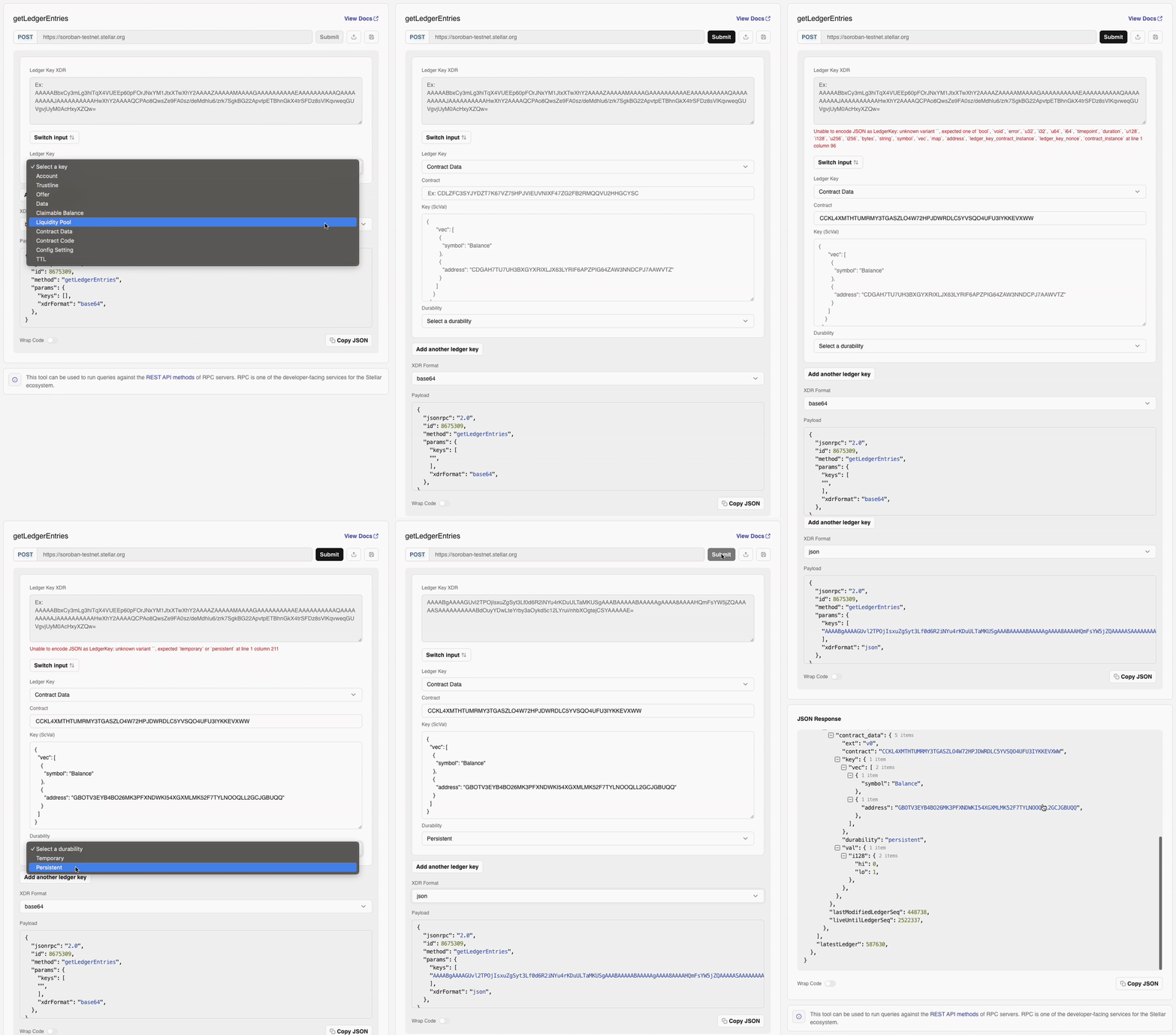
Constructing Calls
The getLedgerEntries method returns the "values" (or "entries") for a given set of "keys." Ledger keys come in a lot of forms, and we'll go over the commonly used ones on this page alongside tutorials on how to build and use them.
The source of truth should always be the XDR defined in the protocol. LedgerKeys are a union type defined in Stellar-ledger-entries.x.
An interesting product of the store's internal design is that the key is a subset of the entry: we'll see more of this later.
For more on the types of LedgerKey entries and their purposes, see Ledger Entries.
Accounts
To fetch an account, all you need is its public key:
- TypeScript
- Python
- Java
- Go
import { Keypair, xdr } from "@stellar/stellar-sdk";

const publicKey = "GALAXYVOIDAOPZTDLHILAJQKCVVFMD4IKLXLSZV5YHO7VY74IWZILUTO";
const accountLedgerKey = xdr.LedgerKey.ledgerKeyAccount(
  new xdr.LedgerKeyAccount({
    accountId: Keypair.fromPublicKey(publicKey).xdrAccountId(),
  }),
);
console.log(accountLedgerKey.toXDR("base64"));
from stellar_sdk import Keypair, xdr

public_key = "GALAXYVOIDAOPZTDLHILAJQKCVVFMD4IKLXLSZV5YHO7VY74IWZILUTO"
accountLedgerKey = xdr.LedgerKey(
    type = xdr.LedgerEntryType.ACCOUNT,
    account = xdr.LedgerKeyAccount(
        account_id = Keypair.from_public_key(public_key).xdr_account_id()
    ),
)
print(accountLedgerKey.to_xdr())
import java.io.ByteArrayOutputStream;
import java.io.IOException;
import java.util.Base64;
import org.stellar.sdk.KeyPair;
import org.stellar.sdk.xdr.LedgerEntryType;
import org.stellar.sdk.xdr.LedgerKey;
import org.stellar.sdk.xdr.LedgerKeyAccount;
import org.stellar.sdk.xdr.XdrDataOutputStream;

public class AccountLedgerKeyExample {
  public static void main(String[] args) throws IOException {
    String publicKey = "GALAXYVOIDAOPZTDLHILAJQKCVVFMD4IKLXLSZV5YHO7VY74IWZILUTO";

    LedgerKeyAccount ledgerKeyAccount = new LedgerKeyAccount();
    ledgerKeyAccount.setAccountID(KeyPair.fromAccountId(publicKey).getXdrAccountId());

    LedgerKey accountLedgerKey = new LedgerKey();
    accountLedgerKey.setDiscriminant(LedgerEntryType.ACCOUNT);
    accountLedgerKey.setAccount(ledgerKeyAccount);

    ByteArrayOutputStream output = new ByteArrayOutputStream();
    XdrDataOutputStream xdrOutput = new XdrDataOutputStream(output);
    LedgerKey.encode(xdrOutput, accountLedgerKey);
    String base64 = Base64.getEncoder().encodeToString(output.toByteArray());
    System.out.println(base64);
  }
}
package main

import (
  "bytes"
  "encoding/base64"
  "fmt"

  "github.com/stellar/go-stellar-sdk/xdr"
)

func main() {
  publicKey := "GALAXYVOIDAOPZTDLHILAJQKCVVFMD4IKLXLSZV5YHO7VY74IWZILUTO"

  accountLedgerKey := xdr.LedgerKey{
    Type: xdr.LedgerEntryTypeAccount,
    Account: &xdr.LedgerKeyAccount{
      AccountId: xdr.MustAddress(publicKey),
    },
  }

  var buffer bytes.Buffer
  if _, err := xdr.Marshal(&buffer, accountLedgerKey); err != nil {
    panic(err)
  }

  fmt.Println(base64.StdEncoding.EncodeToString(buffer.Bytes()))
}
This will give you the full account details.
- TypeScript
- Python
- Java
- Go
const accountEntryData = (
  await s.getLedgerEntries(accountLedgerKey)
).entries[0].account();
account_entry_data = xdr.LedgerEntryData.from_xdr(
    server.get_ledger_entries([accountLedgerKey]).entries[0].xdr
).account
import java.util.Collections;
import org.stellar.sdk.SorobanServer;
import org.stellar.sdk.responses.sorobanrpc.GetLedgerEntriesResponse;
import org.stellar.sdk.xdr.AccountEntry;

SorobanServer server = new SorobanServer("https://soroban-testnet.stellar.org");
GetLedgerEntriesResponse response =
    server.getLedgerEntries(Collections.singleton(accountLedgerKey));
AccountEntry accountEntryData = response.getEntries().get(0).parseXdr().getAccount();
package main

import (
  "context"

  rpcclient "github.com/stellar/go-stellar-sdk/clients/rpcclient"
  rpctypes "github.com/stellar/go-stellar-sdk/protocols/rpc"
  "github.com/stellar/go-stellar-sdk/xdr"
)

func fetchAccountEntry() xdr.AccountEntry {
  publicKey := "GALAXYVOIDAOPZTDLHILAJQKCVVFMD4IKLXLSZV5YHO7VY74IWZILUTO"
  accountLedgerKey := xdr.LedgerKey{
    Type: xdr.LedgerEntryTypeAccount,
    Account: &xdr.LedgerKeyAccount{
      AccountId: xdr.MustAddress(publicKey),
    },
  }

  keyB64, err := xdr.MarshalBase64(accountLedgerKey)
  if err != nil {
    panic(err)
  }

  client := rpcclient.NewClient("https://soroban-testnet.stellar.org", nil)
  defer client.Close()

  resp, err := client.GetLedgerEntries(context.Background(), rpctypes.GetLedgerEntriesRequest{
    Keys: []string{keyB64},
  })
  if err != nil {
    panic(err)
  }

  var entry xdr.LedgerEntryData
  if err := xdr.SafeUnmarshalBase64(resp.Entries[0].DataXDR, &entry); err != nil {
    panic(err)
  }
  return *entry.Account
}
If you just want to take a look at the structure, you can pass the raw base64 value we logged above to the Laboratory (or via curl if you pass "xdrFormat": "json" as an additional parameter to getLedgerEntries) and see all of the possible fields. You can also dig into them in code, of course:
- TypeScript
- Python
- Java
- Go
console.log(
  `Account ${publicKey} has ${accountEntryData
    .balance()
    .toString()} stroops of XLM and is on sequence number ${accountEntryData
    .seqNum()
    .toString()}`,
);
print(
  f"Account {public_key} has {account_entry_data.balance.int64} stroops of XLM and is on sequence number {account_entry_data.seq_num.sequence_number.int64}"
)
System.out.printf(
  "Account %s has %d stroops of XLM and is on sequence number %d%n",
  publicKey,
  accountEntryData.getBalance().getInt64(),
  accountEntryData.getSeqNum().getSequenceNumber().getInt64());
fmt.Printf(
  "Account %s has %d stroops of XLM and is on sequence number %d\n",
  publicKey,
  accountEntryData.Balance,
  int64(accountEntryData.SeqNum),
)
Trustlines
A trustline is a balance entry for any non-native asset like AstroDollars. To fetch one, you need the trustline owner (a public key like for Accounts) and the asset in question:
- TypeScript
- Python
- Java
- Go
const trustlineLedgerKey = xdr.LedgerKey.ledgerKeyTrustLine(
  new xdr.LedgerKeyTrustLine({
    accountId: Keypair.fromPublicKey(publicKey).xdrAccountId(),
    asset: new Asset(
      "AstroDollar",
      "GDRM3MK6KMHSYIT4E2AG2S2LWTDBJNYXE4H72C7YTTRWOWX5ZBECFWO7",
    ).toTrustLineXDRObject(),
  }),
);
trustlineLedgerKey = xdr.LedgerKey(
    type = xdr.LedgerEntryType.TRUSTLINE,
    trust_line = xdr.LedgerKeyTrustLine(
        account_id = Keypair.from_public_key(public_key).xdr_account_id(),
        asset = Asset(
            "AstroDollar", "GDRM3MK6KMHSYIT4E2AG2S2LWTDBJNYXE4H72C7YTTRWOWX5ZBECFWO7"
        ).to_trust_line_asset_xdr_object(),
    ),
)

trustline_entry_data = xdr.LedgerEntryData.from_xdr(
    server.get_ledger_entries([trustlineLedgerKey]).entries[0].xdr
).trust_line
import java.util.Collections;
import org.stellar.sdk.Asset;
import org.stellar.sdk.KeyPair;
import org.stellar.sdk.SorobanServer;
import org.stellar.sdk.responses.sorobanrpc.GetLedgerEntriesResponse;
import org.stellar.sdk.xdr.LedgerEntryType;
import org.stellar.sdk.xdr.LedgerKey;
import org.stellar.sdk.xdr.LedgerKeyTrustLine;
import org.stellar.sdk.xdr.TrustLineEntry;

SorobanServer server = new SorobanServer("https://soroban-testnet.stellar.org");

Asset astroDollar = Asset.createNonNativeAsset(
    "AstroDollar", "GDRM3MK6KMHSYIT4E2AG2S2LWTDBJNYXE4H72C7YTTRWOWX5ZBECFWO7");
LedgerKeyTrustLine trustLineKey = new LedgerKeyTrustLine();
trustLineKey.setAccountID(KeyPair.fromAccountId(publicKey).getXdrAccountId());
trustLineKey.setAsset(astroDollar.toXdr());

LedgerKey trustlineLedgerKey = new LedgerKey();
trustlineLedgerKey.setDiscriminant(LedgerEntryType.TRUSTLINE);
trustlineLedgerKey.setTrustLine(trustLineKey);

GetLedgerEntriesResponse trustlineResponse =
    server.getLedgerEntries(Collections.singleton(trustlineLedgerKey));
TrustLineEntry trustlineEntryData =
    trustlineResponse.getEntries().get(0).parseXdr().getTrustLine();
package main

import (
  "context"

  rpcclient "github.com/stellar/go/clients/rpcclient"
  rpctypes "github.com/stellar/go/protocols/rpc"
  "github.com/stellar/go/txnbuild"
  "github.com/stellar/go/xdr"
)

func fetchTrustlineEntry(publicKey string) xdr.TrustLineEntry {
  asset := txnbuild.CreditAsset{
    Code:   "AstroDollar",
    Issuer: "GDRM3MK6KMHSYIT4E2AG2S2LWTDBJNYXE4H72C7YTTRWOWX5ZBECFWO7",
  }
  trustlineAsset, err := asset.MustToTrustLineAsset().ToXDR()
  if err != nil {
    panic(err)
  }

  ledgerKey := xdr.LedgerKey{
    Type: xdr.LedgerEntryTypeTrustline,
    TrustLine: &xdr.LedgerKeyTrustLine{
      AccountId: xdr.MustAddress(publicKey),
      Asset:     trustlineAsset,
    },
  }

  keyB64, err := xdr.MarshalBase64(ledgerKey)
  if err != nil {
    panic(err)
  }

  client := rpcclient.NewClient("https://soroban-testnet.stellar.org", nil)
  defer client.Close()

  resp, err := client.GetLedgerEntries(context.Background(), rpctypes.GetLedgerEntriesRequest{
    Keys: []string{keyB64},
  })
  if err != nil {
    panic(err)
  }

  var entry xdr.LedgerEntryData
  if err := xdr.SafeUnmarshalBase64(resp.Entries[0].DataXDR, &entry); err != nil {
    panic(err)
  }
  return *entry.TrustLine
}
Much like an account, the resulting entry has a balance, but it also has a limit and flags to control how much of that asset can be held. The asset, however, can be either an issued asset or a liquidity pool:
- TypeScript
- Python
- Java
- Go
let asset: string;
let rawAsset = trustlineEntryData.asset();

switch (rawAsset.switch().value) {
  case AssetType.assetTypeCreditAlphanum4().value:
    asset = Asset.fromOperation(
      xdr.Asset.assetTypeCreditAlphanum4(rawAsset.alphaNum4()),
    ).toString();
    break;

  case AssetType.assetTypeCreditAlphanum12().value:
    asset = Asset.fromOperation(
      xdr.Asset.assetTypeCreditAlphanum12(rawAsset.alphaNum12()),
    ).toString();
    break;

  case AssetType.assetTypePoolShare().value:
    asset = rawAsset.liquidityPoolId().toXDR("hex");
    break;
}

console.log(
  `Account ${publicKey} has ${trustlineEntryData
    .balance()
    .toString()} stroops of ${asset} with a limit of ${trustlineEntryData
    .limit()
    .toString()}`,
);
raw_asset = trustline_entry_data.asset
asset: str = ""

if (
    raw_asset.type == xdr.AssetType.ASSET_TYPE_CREDIT_ALPHANUM4
    or raw_asset.type == xdr.AssetType.ASSET_TYPE_CREDIT_ALPHANUM12
):
    asset_obj = Asset.from_xdr_object(raw_asset)
    asset = f"{asset_obj.code}:{asset_obj.issuer}"
elif raw_asset.type == xdr.AssetType.ASSET_TYPE_POOL_SHARE:
    asset_obj = LiquidityPoolId.from_xdr_object(raw_asset)
    asset = f"{asset_obj.liquidity_pool_id}"
else:
    raise ValueError("Invalid asset type")

print(
    f"Account {public_key} has {trustline_entry_data.balance.int64} stroops of {asset} with a limit of {trustline_entry_data.limit.int64}"
)
import java.util.Locale;
import javax.xml.bind.DatatypeConverter;
import org.stellar.sdk.Asset;
import org.stellar.sdk.xdr.TrustLineAsset;

TrustLineAsset rawAsset = trustlineEntryData.getAsset();
String assetDescription;

switch (rawAsset.getDiscriminant()) {
  case ASSET_TYPE_CREDIT_ALPHANUM4:
  case ASSET_TYPE_CREDIT_ALPHANUM12:
    org.stellar.sdk.xdr.Asset assetXdr = new org.stellar.sdk.xdr.Asset();
    assetXdr.setDiscriminant(rawAsset.getDiscriminant());
    if (rawAsset.getDiscriminant()
        == org.stellar.sdk.xdr.AssetType.ASSET_TYPE_CREDIT_ALPHANUM4) {
      assetXdr.setAlphaNum4(rawAsset.getAlphaNum4());
    } else {
      assetXdr.setAlphaNum12(rawAsset.getAlphaNum12());
    }
    assetDescription = Asset.fromXdr(assetXdr).toString();
    break;
  case ASSET_TYPE_POOL_SHARE:
    byte[] poolIdBytes = rawAsset.getLiquidityPoolID().getPoolID().getHash();
    assetDescription =
        DatatypeConverter.printHexBinary(poolIdBytes).toLowerCase(Locale.ROOT);
    break;
  default:
    throw new IllegalStateException("Unsupported trustline asset type");
}

System.out.printf(
    "Account %s has %d stroops of %s with a limit of %d%n",
    publicKey,
    trustlineEntryData.getBalance().getInt64(),
    assetDescription,
    trustlineEntryData.getLimit().getInt64());
package main

import (
  "encoding/hex"
  "fmt"
  "strings"

  "github.com/stellar/go/strkey"
  "github.com/stellar/go/xdr"
)

func describeTrustline(publicKey string, trustlineEntry xdr.TrustLineEntry) {
  rawAsset := trustlineEntry.Asset
  var asset string

  switch rawAsset.Type {
  case xdr.AssetTypeAssetTypeCreditAlphanum4:
    a4 := rawAsset.MustAlphaNum4()
    code := strings.TrimRight(string(a4.AssetCode[:]), "\x00")
    issuer := a4.Issuer.MustEd25519()
    issuerAddr, err := strkey.Encode(strkey.VersionByteAccountID, issuer[:])
    if err != nil {
      panic(err)
    }
    asset = fmt.Sprintf("%s:%s", code, issuerAddr)
  case xdr.AssetTypeAssetTypeCreditAlphanum12:
    a12 := rawAsset.MustAlphaNum12()
    code := strings.TrimRight(string(a12.AssetCode[:]), "\x00")
    issuer := a12.Issuer.MustEd25519()
    issuerAddr, err := strkey.Encode(strkey.VersionByteAccountID, issuer[:])
    if err != nil {
      panic(err)
    }
    asset = fmt.Sprintf("%s:%s", code, issuerAddr)
  case xdr.AssetTypeAssetTypePoolShare:
    poolID := rawAsset.MustLiquidityPoolId()
    hash := xdr.Hash(poolID)
    asset = hex.EncodeToString(hash[:])
  default:
    panic("unsupported trustline asset")
  }

  fmt.Printf(
    "Account %s has %d stroops of %s with a limit of %d\n",
    publicKey,
    trustlineEntry.Balance,
    asset,
    trustlineEntry.Limit,
  )
}
Offers
An offer represents a live order on the DEX. Each offer is identified by its offerID. To construct a LedgerKey for an offer, you only need the offer ID:
- TypeScript
- Java
- Go
const offerLedgerKey = xdr.LedgerKey.ledgerKeyOffer(
  new xdr.LedgerKeyOffer({
    offerID: 123456789n,
  }),
);
console.log(offerLedgerKey.toXDR("base64"));
import java.io.ByteArrayOutputStream;
import java.io.IOException;
import java.util.Base64;
import org.stellar.sdk.KeyPair;
import org.stellar.sdk.xdr.Int64;
import org.stellar.sdk.xdr.LedgerEntryType;
import org.stellar.sdk.xdr.LedgerKey;
import org.stellar.sdk.xdr.LedgerKeyOffer;
import org.stellar.sdk.xdr.XdrDataOutputStream;

String sellerPublicKey = "GBSD6VAFS2Z3PUSF4BOACMF4NFKWY5I3Q2ZQ2CJQEXAMPLE00000000";

LedgerKeyOffer offerKey = new LedgerKeyOffer();
offerKey.setSellerID(KeyPair.fromAccountId(sellerPublicKey).getXdrAccountId());
offerKey.setOfferID(new Int64(123456789L));

LedgerKey offerLedgerKey = new LedgerKey();
offerLedgerKey.setDiscriminant(LedgerEntryType.OFFER);
offerLedgerKey.setOffer(offerKey);

ByteArrayOutputStream output = new ByteArrayOutputStream();
XdrDataOutputStream xdrOutput = new XdrDataOutputStream(output);
LedgerKey.encode(xdrOutput, offerLedgerKey);
System.out.println(Base64.getEncoder().encodeToString(output.toByteArray()));
package main

import (
  "fmt"

  "github.com/stellar/go/xdr"
)

func offerLedgerKeyBase64() string {
  seller := "GBSD6VAFS2Z3PUSF4BOACMF4NFKWY5I3Q2ZQ2CJQEXAMPLE00000000"

  ledgerKey := xdr.LedgerKey{
    Type: xdr.LedgerEntryTypeOffer,
    Offer: &xdr.LedgerKeyOffer{
      SellerId: xdr.MustAddress(seller),
      OfferId:  xdr.Int64(123456789),
    },
  }

  encoded, err := xdr.MarshalBase64(ledgerKey)
  if err != nil {
    panic(err)
  }
  return encoded
}

func main() {
  fmt.Println(offerLedgerKeyBase64())
}
Once you have the ledger entry, you can extract its fields:
- TypeScript
- Java
- Go
const offerEntryData = (
  await s.getLedgerEntries(offerLedgerKey)
).entries[0].offer();

console.log(`Offer ID: ${offerEntryData.offerId().toString()}`);
console.log(`Seller: ${offerEntryData.sellerId().accountId()}`);
console.log(`Amount: ${offerEntryData.amount().toString()}`); // of selling
console.log(
  `Price: ${offerEntryData.price().n().toString()} / ${offerEntryData.price().d().toString()}`,
);
import java.util.Collections;
import org.stellar.sdk.KeyPair;
import org.stellar.sdk.SorobanServer;
import org.stellar.sdk.responses.sorobanrpc.GetLedgerEntriesResponse;
import org.stellar.sdk.xdr.OfferEntry;

SorobanServer server = new SorobanServer("https://soroban-testnet.stellar.org");
GetLedgerEntriesResponse response =
    server.getLedgerEntries(Collections.singleton(offerLedgerKey));
OfferEntry offerEntryData = response.getEntries().get(0).parseXdr().getOffer();

System.out.printf("Offer ID: %d%n", offerEntryData.getOfferID().getInt64());
System.out.printf(
    "Seller: %s%n",
    KeyPair.fromXdrPublicKey(offerEntryData.getSellerID().getAccountID()).getAccountId());
System.out.printf("Amount (selling): %d%n", offerEntryData.getAmount().getInt64());
System.out.printf(
    "Price: %d / %d%n",
    offerEntryData.getPrice().getN().getInt32(),
    offerEntryData.getPrice().getD().getInt32());
package main

import (
  "context"
  "fmt"

  rpcclient "github.com/stellar/go/clients/rpcclient"
  rpctypes "github.com/stellar/go/protocols/rpc"
  "github.com/stellar/go/xdr"
)

func fetchOfferEntry(key xdr.LedgerKey) xdr.OfferEntry {
  keyB64, err := xdr.MarshalBase64(key)
  if err != nil {
    panic(err)
  }

  client := rpcclient.NewClient("https://soroban-testnet.stellar.org", nil)
  defer client.Close()

  resp, err := client.GetLedgerEntries(context.Background(), rpctypes.GetLedgerEntriesRequest{
    Keys: []string{keyB64},
  })
  if err != nil {
    panic(err)
  }

  var data xdr.LedgerEntryData
  if err := xdr.SafeUnmarshalBase64(resp.Entries[0].DataXDR, &data); err != nil {
    panic(err)
  }
  return *data.Offer
}

func describeOffer(entry xdr.OfferEntry) {
  fmt.Printf("Offer ID: %d\n", entry.OfferId)
  seller, _ := entry.SellerId.GetAddress()
  fmt.Printf("Seller: %s\n", seller)
  fmt.Printf("Amount (selling): %d\n", entry.Amount)
  fmt.Printf("Price: %d / %d\n", entry.Price.N, entry.Price.D)
}
You can then decode the selling and buying assets the same way you do for Trustlines, by inspecting offerEntryData.selling() and offerEntryData.buying() using the standard xdr.Asset parsing logic.
Claimable Balances
A claimable balance represents assets that have been locked under certain claim conditions. Each claimable balance is identified by its balanceId, which is a 32-byte hash.
To construct a LedgerKey for a claimable balance, you need the balanceId as a Buffer or Uint8Array:
- TypeScript
- Java
- Go
const balanceIdHex =
  "407a334017a508fb2bf41952c74f977b46147ed70b175717f8bacc0ca3f2cc5b";
const balanceIdBytes = Buffer.from(balanceIdHex, "hex");

const claimableBalanceLedgerKey = xdr.LedgerKey.ledgerKeyClaimableBalance(
  new xdr.LedgerKeyClaimableBalance({
    balanceID: xdr.ClaimableBalanceID.claimableBalanceIdTypeV0(balanceIdBytes),
  }),
);
console.log(claimableBalanceLedgerKey.toXDR("base64"));
import java.io.ByteArrayOutputStream;
import java.io.IOException;
import java.util.Base64;
import javax.xml.bind.DatatypeConverter;
import org.stellar.sdk.xdr.ClaimableBalanceID;
import org.stellar.sdk.xdr.ClaimableBalanceIDType;
import org.stellar.sdk.xdr.Hash;
import org.stellar.sdk.xdr.LedgerEntryType;
import org.stellar.sdk.xdr.LedgerKey;
import org.stellar.sdk.xdr.LedgerKeyClaimableBalance;
import org.stellar.sdk.xdr.XdrDataOutputStream;

String balanceIdHex =
    "407a334017a508fb2bf41952c74f977b46147ed70b175717f8bacc0ca3f2cc5b";
byte[] balanceIdBytes = DatatypeConverter.parseHexBinary(balanceIdHex);

Hash balanceHash = new Hash(balanceIdBytes);
ClaimableBalanceID balanceId =
    ClaimableBalanceID.builder()
        .discriminant(ClaimableBalanceIDType.CLAIMABLE_BALANCE_ID_TYPE_V0)
        .v0(balanceHash)
        .build();

LedgerKeyClaimableBalance balanceKey = new LedgerKeyClaimableBalance();
balanceKey.setBalanceID(balanceId);

LedgerKey ledgerKey = new LedgerKey();
ledgerKey.setDiscriminant(LedgerEntryType.CLAIMABLE_BALANCE);
ledgerKey.setClaimableBalance(balanceKey);

ByteArrayOutputStream output = new ByteArrayOutputStream();
XdrDataOutputStream xdrOutput = new XdrDataOutputStream(output);
LedgerKey.encode(xdrOutput, ledgerKey);
System.out.println(Base64.getEncoder().encodeToString(output.toByteArray()));
package main

import (
  "encoding/hex"
  "fmt"

  "github.com/stellar/go/xdr"
)

func buildClaimableBalanceKey() xdr.LedgerKey {
  balanceIdHex :=
    "407a334017a508fb2bf41952c74f977b46147ed70b175717f8bacc0ca3f2cc5b"
  raw, err := hex.DecodeString(balanceIdHex)
  if err != nil {
    panic(err)
  }

  var balanceHash xdr.Hash
  copy(balanceHash[:], raw)

  return xdr.LedgerKey{
    Type: xdr.LedgerEntryTypeClaimableBalance,
    ClaimableBalance: &xdr.LedgerKeyClaimableBalance{
      BalanceId: xdr.ClaimableBalanceId{
        Type: xdr.ClaimableBalanceIdTypeClaimableBalanceIdTypeV0,
        V0:   &balanceHash,
      },
    },
  }
}

func main() {
  key := buildClaimableBalanceKey()
  b64, err := xdr.MarshalBase64(key)
  if err != nil {
    panic(err)
  }
  fmt.Println(b64)
}
Once you have the ledger entry, you can extract its fields:
- TypeScript
- Java
- Go
const claimableBalanceEntryData = (
  await s.getLedgerEntries(claimableBalanceLedgerKey)
).entries[0].claimableBalance();

console.log(`Amount: ${claimableBalanceEntryData.amount().toString()} stroops`);

const asset = claimableBalanceEntryData.asset();
// Decode asset similar to as in trustlines

const claimants = claimableBalanceEntryData.claimants();

if (claimableBalanceEntryData.ext().switch().value === 1) {
  const flags = claimableBalanceEntryData.ext().v1().flags();
  const clawbackEnabled =
    (flags &
      xdr.ClaimableBalanceFlags.claimableBalanceClawbackEnabledFlag()) !==
    0;
  console.log(`Clawback Enabled: ${clawbackEnabled}`);
}
import java.util.Collections;
import org.stellar.sdk.Asset;
import org.stellar.sdk.SorobanServer;
import org.stellar.sdk.responses.sorobanrpc.GetLedgerEntriesResponse;
import org.stellar.sdk.xdr.ClaimableBalanceEntry;
import org.stellar.sdk.xdr.ClaimableBalanceFlags;
import org.stellar.sdk.xdr.Claimant;

SorobanServer server = new SorobanServer("https://soroban-testnet.stellar.org");
GetLedgerEntriesResponse response =
    server.getLedgerEntries(Collections.singleton(claimableBalanceLedgerKey));
ClaimableBalanceEntry claimableBalanceEntryData =
    response.getEntries().get(0).parseXdr().getClaimableBalance();

System.out.printf(
    "Amount: %d stroops%n", claimableBalanceEntryData.getAmount().getInt64());

Asset asset = claimableBalanceEntryData.getAsset(); // decode like trustlines
Claimant[] claimants = claimableBalanceEntryData.getClaimants();

if (claimableBalanceEntryData.getExt().getDiscriminant() == 1) {
  long flags = claimableBalanceEntryData.getExt().getV1().getFlags().getInt32();
  boolean clawbackEnabled =
      (flags
              & ClaimableBalanceFlags.CLAIMABLE_BALANCE_CLAWBACK_ENABLED_FLAG.getValue())
          != 0;
  System.out.printf("Clawback Enabled: %s%n", clawbackEnabled);
}
package main

import (
  "context"
  "fmt"

  rpcclient "github.com/stellar/go/clients/rpcclient"
  rpctypes "github.com/stellar/go/protocols/rpc"
  "github.com/stellar/go/xdr"
)

func fetchClaimableBalance(key xdr.LedgerKey) xdr.ClaimableBalanceEntry {
  keyB64, err := xdr.MarshalBase64(key)
  if err != nil {
    panic(err)
  }

  client := rpcclient.NewClient("https://soroban-testnet.stellar.org", nil)
  defer client.Close()

  resp, err := client.GetLedgerEntries(context.Background(), rpctypes.GetLedgerEntriesRequest{
    Keys: []string{keyB64},
  })
  if err != nil {
    panic(err)
  }

  var data xdr.LedgerEntryData
  if err := xdr.SafeUnmarshalBase64(resp.Entries[0].DataXDR, &data); err != nil {
    panic(err)
  }
  return *data.ClaimableBalance
}

func describeClaimableBalance(entry xdr.ClaimableBalanceEntry) {
  fmt.Printf("Amount: %d stroops\n", entry.Amount)
  fmt.Printf("Claimants: %d\n", len(entry.Claimants))

  if entry.Ext.V1 != nil {
    flags := uint32(entry.Ext.V1.Flags)
    clawbackEnabled := (flags & uint32(xdr.ClaimableBalanceFlagsClaimableBalanceClawbackEnabledFlag)) != 0
    fmt.Printf("Clawback Enabled: %t\n", clawbackEnabled)
  }
}
Claimants and Predicates
Claimable balances contain one or more claimants, each with a claim predicate. You can iterate through them as follows:
- TypeScript
- Java
- Go
for (let i = 0; i < claimants.length; i++) {
  const claimant = claimants[i].v0();
  const destination = claimant.destination().accountId();
  console.log(`Claimant ${i + 1}: ${destination}`);

  const predicate = claimant.predicate();
  const predicateType = predicate.switch().value;

  switch (predicateType) {
    case xdr.ClaimPredicateType.claimPredicateUnconditional().value:
      console.log("Predicate: Unconditional");
      break;
    case xdr.ClaimPredicateType.claimPredicateBeforeAbsoluteTime().value:
      console.log(`Predicate: Before Absolute Time = ${predicate.absBefore().toString()}`);
      break;
    case xdr.ClaimPredicateType.claimPredicateBeforeRelativeTime().value:
      console.log(`Predicate: Before Relative Time = ${predicate.relBefore().toString()} seconds`);
      break;
    default:
      console.log("Predicate: Complex predicate type (AND/OR/NOT)");
      break;
}
import org.stellar.sdk.KeyPair;
import org.stellar.sdk.xdr.Claimant;
import org.stellar.sdk.xdr.ClaimPredicateType;

for (int i = 0; i < claimants.length; i++) {
  Claimant.ClaimantV0 claimant = claimants[i].getV0();
  String destination =
      KeyPair.fromXdrPublicKey(claimant.getDestination().getAccountID()).getAccountId();
  System.out.printf("Claimant %d: %s%n", i + 1, destination);

  switch (claimant.getPredicate().getDiscriminant()) {
    case CLAIM_PREDICATE_UNCONDITIONAL:
      System.out.println("Predicate: Unconditional");
      break;
    case CLAIM_PREDICATE_BEFORE_ABSOLUTE_TIME:
      System.out.printf(
          "Predicate: Before Absolute Time = %d%n",
          claimant.getPredicate().getAbsBefore().getInt64());
      break;
    case CLAIM_PREDICATE_BEFORE_RELATIVE_TIME:
      System.out.printf(
          "Predicate: Before Relative Time = %d seconds%n",
          claimant.getPredicate().getRelBefore().getInt64());
      break;
    default:
      System.out.println("Predicate: Complex predicate type (AND/OR/NOT)");
      break;
  }
}
package main

import (
  "fmt"

  "github.com/stellar/go/xdr"
)

func printClaimants(claimants []xdr.Claimant) {
  for i, claimant := range claimants {
    dest, _ := claimant.V0.Destination.GetAddress()
    fmt.Printf("Claimant %d: %s\n", i+1, dest)

    switch claimant.V0.Predicate.Type {
    case xdr.ClaimPredicateTypeClaimPredicateUnconditional:
      fmt.Println("Predicate: Unconditional")
    case xdr.ClaimPredicateTypeClaimPredicateBeforeAbsoluteTime:
      if claimant.V0.Predicate.AbsBefore != nil {
        fmt.Printf(
          "Predicate: Before Absolute Time = %d\n",
          int64(*claimant.V0.Predicate.AbsBefore),
        )
      }
    case xdr.ClaimPredicateTypeClaimPredicateBeforeRelativeTime:
      if claimant.V0.Predicate.RelBefore != nil {
        fmt.Printf(
          "Predicate: Before Relative Time = %d seconds\n",
          int64(*claimant.V0.Predicate.RelBefore),
        )
      }
    default:
      fmt.Println("Predicate: Complex predicate type (AND/OR/NOT)")
    }
  }
}
Flags
If the claimable balance has flags set (not v0), you can read them like this:
- TypeScript
- Java
- Go
switch (claimableBalanceEntryData.ext().switch().value) {
  case 0: // No flags
    break;
  case 1:
    const flags = claimableBalanceEntryData.ext().v1().flags();
    const clawbackEnabled = (flags & 1) !== 0; // claw = 0x1
    console.log(`Clawback Enabled: ${clawbackEnabled}`);
    break;
}
switch (claimableBalanceEntryData.getExt().getDiscriminant()) {
  case 0:
    break;
  case 1:
    long flags = claimableBalanceEntryData.getExt().getV1().getFlags().getInt32();
    boolean clawbackEnabled =
        (flags
                & ClaimableBalanceFlags.CLAIMABLE_BALANCE_CLAWBACK_ENABLED_FLAG.getValue())
            != 0;
    System.out.printf("Clawback Enabled: %s%n", clawbackEnabled);
    break;
}
switch claimableBalanceEntry.Ext.V1 {
case nil:
  // No flags
default:
  flags := uint32(claimableBalanceEntry.Ext.V1.Flags)
  clawbackEnabled := (flags & uint32(xdr.ClaimableBalanceFlagsClaimableBalanceClawbackEnabledFlag)) != 0
  fmt.Printf("Clawback Enabled: %t\n", clawbackEnabled)
}
Liquidity Pools
A liquidity pool represents an Automated Market Maker holding two assets. Each liquidity pool is identified by its liquidityPoolID, which is a 32-byte hash.
To construct a LedgerKey for an AMM, you need the liquidity-pool ID as a Buffer or Uint8Array. Core deterministicly stores this as a 64-char hex string.
- TypeScript
- Java
- Go
const liquidityPoolIdHex =
  "82f857462d5304e1ad7d5308fb6d90ff3e70ad8fb07b81d04b12d2cc867fc735";
const liquidityPoolIdBytes = Buffer.from(liquidityPoolIdHex, "hex");

const liquidityPoolLedgerKey = xdr.LedgerKey.ledgerKeyLiquidityPool(
  new xdr.LedgerKeyLiquidityPool({
    liquidityPoolID: liquidityPoolIdBytes,
  }),
);
console.log(liquidityPoolLedgerKey.toXDR("base64"));
import java.io.ByteArrayOutputStream;
import java.io.IOException;
import java.util.Base64;
import javax.xml.bind.DatatypeConverter;
import org.stellar.sdk.xdr.Hash;
import org.stellar.sdk.xdr.LedgerEntryType;
import org.stellar.sdk.xdr.LedgerKey;
import org.stellar.sdk.xdr.LedgerKeyLiquidityPool;
import org.stellar.sdk.xdr.XdrDataOutputStream;

String liquidityPoolIdHex =
    "82f857462d5304e1ad7d5308fb6d90ff3e70ad8fb07b81d04b12d2cc867fc735";
byte[] liquidityPoolIdBytes = DatatypeConverter.parseHexBinary(liquidityPoolIdHex);

Hash liquidityPoolHash = new Hash(liquidityPoolIdBytes);
LedgerKeyLiquidityPool liquidityPoolKey = new LedgerKeyLiquidityPool();
liquidityPoolKey.setLiquidityPoolID(liquidityPoolHash);

LedgerKey liquidityPoolLedgerKey = new LedgerKey();
liquidityPoolLedgerKey.setDiscriminant(LedgerEntryType.LIQUIDITY_POOL);
liquidityPoolLedgerKey.setLiquidityPool(liquidityPoolKey);

ByteArrayOutputStream output = new ByteArrayOutputStream();
XdrDataOutputStream xdrOutput = new XdrDataOutputStream(output);
LedgerKey.encode(xdrOutput, liquidityPoolLedgerKey);
System.out.println(Base64.getEncoder().encodeToString(output.toByteArray()));
package main

import (
  "encoding/hex"
  "fmt"

  "github.com/stellar/go/xdr"
)

func buildLiquidityPoolKey() xdr.LedgerKey {
  liquidityPoolIdHex :=
    "82f857462d5304e1ad7d5308fb6d90ff3e70ad8fb07b81d04b12d2cc867fc735"
  raw, err := hex.DecodeString(liquidityPoolIdHex)
  if err != nil {
    panic(err)
  }

  var poolID xdr.Hash
  copy(poolID[:], raw)

  return xdr.LedgerKey{
    Type: xdr.LedgerEntryTypeLiquidityPool,
    LiquidityPool: &xdr.LedgerKeyLiquidityPool{
      LiquidityPoolId: poolID,
    },
  }
}

func main() {
  key := buildLiquidityPoolKey()
  b64, err := xdr.MarshalBase64(key)
  if err != nil {
    panic(err)
  }
  fmt.Println(b64)
}
Once you have the ledger entry, you can extract its fields:
- TypeScript
- Java
- Go
const liquidityPoolEntryData = (
  await s.getLedgerEntries(liquidityPoolLedgerKey)
).entries[0].liquidityPool();

console.log(
  `Total Pool Shares: ${liquidityPoolEntryData.totalPoolShares().toString()}`,
);
console.log(
  `Total Trustlines: ${liquidityPoolEntryData.poolSharesTrustLineCount().toString()}`,
);

const AMM = liquidityPoolEntryData.body();
switch (AMM.switch().value) {
  case xdr.LiquidityPoolType.liquidityPoolConstantProduct().value: {
    const params = AMM.constantProduct().params();
    const fee = params.fee(); // basis points
    const assetA = params.assetA();
    const assetB = params.assetB();
    console.log(`Constant-Product Between: ${assetA} and ${assetB}`);
    break;
  }
}
import java.util.Collections;
import org.stellar.sdk.Asset;
import org.stellar.sdk.SorobanServer;
import org.stellar.sdk.responses.sorobanrpc.GetLedgerEntriesResponse;
import org.stellar.sdk.xdr.LiquidityPoolEntry;
import org.stellar.sdk.xdr.LiquidityPoolType;

GetLedgerEntriesResponse response =
    server.getLedgerEntries(Collections.singleton(liquidityPoolLedgerKey));
LiquidityPoolEntry liquidityPoolEntryData =
    response.getEntries().get(0).parseXdr().getLiquidityPool();

System.out.printf(
    "Total Pool Shares: %d%n",
    liquidityPoolEntryData.getTotalPoolShares().getInt64());
System.out.printf(
    "Total Trustlines: %d%n",
    liquidityPoolEntryData.getPoolSharesTrustLineCount().getInt64());

switch (liquidityPoolEntryData.getBody().getDiscriminant()) {
  case LIQUIDITY_POOL_CONSTANT_PRODUCT:
    var params = liquidityPoolEntryData.getBody().getConstantProduct().getParams();
    System.out.printf(
        "Constant-Product Between: %s and %s%n",
        Asset.fromXdr(params.getAssetA()).toString(),
        Asset.fromXdr(params.getAssetB()).toString());
    System.out.printf("Fee (basis points): %d%n", params.getFee().getInt32());
    break;
  default:
    break;
}
package main

import (
  "context"
  "fmt"

  rpcclient "github.com/stellar/go/clients/rpcclient"
  rpctypes "github.com/stellar/go/protocols/rpc"
  "github.com/stellar/go/xdr"
)

func fetchLiquidityPoolEntry(key xdr.LedgerKey) xdr.LiquidityPoolEntry {
  keyB64, err := xdr.MarshalBase64(key)
  if err != nil {
    panic(err)
  }
  client := rpcclient.NewClient("https://soroban-testnet.stellar.org", nil)
  defer client.Close()

  resp, err := client.GetLedgerEntries(context.Background(), rpctypes.GetLedgerEntriesRequest{
    Keys: []string{keyB64},
  })
  if err != nil {
    panic(err)
  }

  var data xdr.LedgerEntryData
  if err := xdr.SafeUnmarshalBase64(resp.Entries[0].DataXDR, &data); err != nil {
    panic(err)
  }
  return *data.LiquidityPool
}

func describeLiquidityPool(entry xdr.LiquidityPoolEntry) {
  fmt.Printf("Total Pool Shares: %d\n", entry.TotalPoolShares)
  fmt.Printf("Total Trustlines: %d\n", entry.PoolSharesTrustLineCount)

  switch entry.Body.Type {
  case xdr.LiquidityPoolTypeLiquidityPoolConstantProduct:
    params := entry.Body.ConstantProduct.Params
    fmt.Printf("Constant-Product Between: %v and %v\n", params.AssetA, params.AssetB)
    fmt.Printf("Fee (basis points): %d\n", params.Fee)
  }
}
Contract Data
Suppose we've deployed the increment example contract and want to find out what value is stored in the COUNTER ledger key. To build the key:
- TypeScript
- Python
- Java
- Go
import { xdr, Address } from "@stellar/stellar-sdk";

const getLedgerKeySymbol = (
  contractId: string,
  symbolText: string,
): xdr.LedgerKey => {
  return xdr.LedgerKey.contractData(
    new xdr.LedgerKeyContractData({
      contract: new Address(contractId).toScAddress(),
      key: xdr.ScVal.scvSymbol(symbolText),
      // The increment contract stores its state in persistent storage,
      // but other contracts may use temporary storage
      // (xdr.ContractDataDurability.temporary()).
      durability: xdr.ContractDataDurability.persistent(),
    }),
  );
};

const ledgerKey = getLedgerKeySymbol(
  "CCPYZFKEAXHHS5VVW5J45TOU7S2EODJ7TZNJIA5LKDVL3PESCES6FNCI",
  "COUNTER",
);
from stellar_sdk import xdr, scval, Address

def getLedgerKeySymbol(contract_id: str, symbol_text: str) -> str:
    ledger_key = xdr.LedgerKey(
        type = xdr.LedgerEntryType.CONTRACT_DATA,
        contract_data = xdr.LedgerKeyContractData(
            contract = Address(contract_id).to_xdr_sc_address(),
            key = scval.to_symbol(symbol_text),
            durability = xdr.ContractDataDurability.PERSISTENT
        ),
    )
    return ledger_key.to_xdr()

print(
    getLedgerKeySymbol(
        "CCPYZFKEAXHHS5VVW5J45TOU7S2EODJ7TZNJIA5LKDVL3PESCES6FNCI",
        "COUNTER"
    )
)
import org.stellar.sdk.Address;
import org.stellar.sdk.scval.Scv;
import org.stellar.sdk.xdr.ContractDataDurability;
import org.stellar.sdk.xdr.LedgerEntryType;
import org.stellar.sdk.xdr.LedgerKey;
import org.stellar.sdk.xdr.LedgerKeyContractData;

LedgerKey getLedgerKeySymbol(String contractId, String symbolText) {
  LedgerKeyContractData contractData = new LedgerKeyContractData();
  contractData.setContract(new Address(contractId).toSCAddress());
  contractData.setKey(Scv.toSymbol(symbolText));
  contractData.setDurability(ContractDataDurability.PERSISTENT);

  LedgerKey ledgerKey = new LedgerKey();
  ledgerKey.setDiscriminant(LedgerEntryType.CONTRACT_DATA);
  ledgerKey.setContractData(contractData);
  return ledgerKey;
}
package main

import (
  "github.com/stellar/go/strkey"
  "github.com/stellar/go/xdr"
)

func ledgerKeySymbol(contractID, symbol string) xdr.LedgerKey {
  raw, err := strkey.Decode(strkey.VersionByteContract, contractID)
  if err != nil {
    panic(err)
  }

  var hash xdr.Hash
  copy(hash[:], raw)
  contract := xdr.ContractId(hash)

  scAddress := xdr.ScAddress{
    Type:       xdr.ScAddressTypeScAddressTypeContract,
    ContractId: &contract,
  }
  symbolVal := xdr.ScSymbol(symbol)
  key := xdr.ScVal{
    Type: xdr.ScValTypeScvSymbol,
    Sym:  &symbolVal,
  }

  return xdr.LedgerKey{
    Type: xdr.LedgerEntryTypeContractData,
    ContractData: &xdr.LedgerKeyContractData{
      Contract:   scAddress,
      Key:        key,
      Durability: xdr.ContractDataDurabilityPersistent,
    },
  }
}
Contract Wasm Code
To understand this, we need a handle on how smart contract deployment works:
- When you deploy a contract, first the code is "installed" (i.e. uploaded onto the blockchain), creating a
LedgerEntrywith the Wasm byte-code that can be uniquely identified by its hash (that is, the hash of the uploaded code itself). - Then, when a contract instance is "instantiated," we create a
LedgerEntrywith a reference to that code's hash. This means many contracts can point to the same Wasm code.
Thus, fetching the contract code is a two-step process:
- First, we look up the contract itself, to see which code hash it is referencing.
- Then, we can look up the raw Wasm byte-code using that hash.
1. Find the ledger key for the contract instance
- TypeScript
- Python
- Java
- Go
import { Contract } from "@stellar/stellar-sdk";

function getLedgerKeyContractCode(contractId): xdr.LedgerKey {
  return new Contract(contractId).getFootprint();
}

console.log(
  getLedgerKeyContractCode(
    "CCPYZFKEAXHHS5VVW5J45TOU7S2EODJ7TZNJIA5LKDVL3PESCES6FNCI",
  ),
);
from stellar_sdk import xdr, Address

def getLedgerKeyContractCode(contract_id: str) -> xdr.LedgerKey:
  return xdr.LedgerKey(
    type = xdr.LedgerEntryType.CONTRACT_DATA,
    contract_data = xdr.LedgerKeyContractData(
      contract = Address(contract_id).to_xdr_sc_address(),
      key = xdr.SCVal(xdr.SCValType.SCV_LEDGER_KEY_CONTRACT_INSTANCE),
      durability = xdr.ContractDataDurability.PERSISTENT
    )
  )

print(getLedgerKeyContractCode(
  "CCPYZFKEAXHHS5VVW5J45TOU7S2EODJ7TZNJIA5LKDVL3PESCES6FNCI"
))
import org.stellar.sdk.Address;
import org.stellar.sdk.scval.Scv;
import org.stellar.sdk.xdr.ContractDataDurability;
import org.stellar.sdk.xdr.LedgerEntryType;
import org.stellar.sdk.xdr.LedgerKey;
import org.stellar.sdk.xdr.LedgerKeyContractData;

LedgerKey getLedgerKeyContractCode(String contractId) {
  LedgerKeyContractData key = new LedgerKeyContractData();
  key.setContract(new Address(contractId).toSCAddress());
  key.setKey(Scv.toLedgerKeyContractInstance());
  key.setDurability(ContractDataDurability.PERSISTENT);

  LedgerKey ledgerKey = new LedgerKey();
  ledgerKey.setDiscriminant(LedgerEntryType.CONTRACT_DATA);
  ledgerKey.setContractData(key);
  return ledgerKey;
}

System.out.println(
    getLedgerKeyContractCode("CCPYZFKEAXHHS5VVW5J45TOU7S2EODJ7TZNJIA5LKDVL3PESCES6FNCI"));
package main

import (
  "github.com/stellar/go/strkey"
  "github.com/stellar/go/xdr"
)

func contractInstanceLedgerKey(contractID string) xdr.LedgerKey {
  raw, err := strkey.Decode(strkey.VersionByteContract, contractID)
  if err != nil {
    panic(err)
  }

  var hash xdr.Hash
  copy(hash[:], raw)
  contract := xdr.ContractId(hash)

  address := xdr.ScAddress{
    Type:       xdr.ScAddressTypeScAddressTypeContract,
    ContractId: &contract,
  }
  key := xdr.ScVal{Type: xdr.ScValTypeScvLedgerKeyContractInstance}

  return xdr.LedgerKey{
    Type: xdr.LedgerEntryTypeContractData,
    ContractData: &xdr.LedgerKeyContractData{
      Contract:   address,
      Key:        key,
      Durability: xdr.ContractDataDurabilityPersistent,
    },
  }
}
Once we have the ledger entry (via getLedgerEntries, see below), we can extract the Wasm hash:
2. Request the ContractCode using the retrieved LedgerKey
Now take the xdr field from the previous response's result object, and create a LedgerKey from the hash contained inside.
- TypeScript
- Python
- Java
- Go
import { xdr } from "@stellar/stellar-sdk";

function getLedgerKeyWasmId(
  contractData: xdr.ContractDataEntry,
): xdr.LedgerKey {
  const wasmHash = contractData.val().instance().executable().wasmHash();

  return xdr.LedgerKey.contractCode(
    new xdr.LedgerKeyContractCode({
      hash: wasmHash,
    }),
  );
}
from stellar_sdk import xdr

def getLedgerKeyWasmId(
  # received from getLedgerEntries and decoded
  contract_data: xdr.ContractDataEntry
) -> xdr.LedgerKey:
  # First, we dig the wasm_id hash out of the xdr we received from RPC
  wasm_hash = contract_data.val.instance.executable.wasm_hash

  # Now, we can create the `LedgerKey` as we've done in previous examples
  ledger_key = xdr.LedgerKey(
    type = xdr.LedgerEntryType.CONTRACT_CODE,
    contract_code = xdr.LedgerKeyContractCode(
      hash = wasm_hash
    ),
  )
  return ledger_key
import org.stellar.sdk.xdr.ContractDataEntry;
import org.stellar.sdk.xdr.LedgerEntryType;
import org.stellar.sdk.xdr.LedgerKey;
import org.stellar.sdk.xdr.LedgerKeyContractCode;

LedgerKey getLedgerKeyWasmId(ContractDataEntry contractData) {
  LedgerKeyContractCode codeKey = new LedgerKeyContractCode();
  codeKey.setHash(contractData.getVal().getInstance().getExecutable().getWasmHash());

  LedgerKey ledgerKey = new LedgerKey();
  ledgerKey.setDiscriminant(LedgerEntryType.CONTRACT_CODE);
  ledgerKey.setContractCode(codeKey);
  return ledgerKey;
}
package main

import (
  "github.com/stellar/go/xdr"
)

func ledgerKeyWasmId(contractData xdr.ContractDataEntry) xdr.LedgerKey {
  wasmHash := contractData.Val.MustInstance().Executable.MustWasmHash()

  return xdr.LedgerKey{
    Type: xdr.LedgerEntryTypeContractCode,
    ContractCode: &xdr.LedgerKeyContractCode{
      Hash: wasmHash,
    },
  }
}
Now, finally we have a LedgerKey that correspond to the Wasm byte-code that has been deployed under the contractId we started out with so very long ago. This LedgerKey can be used in a final request to getLedgerEntries. In that response we will get a LedgerEntryData corresponding to a ContractCodeEntry which will contain the actual, deployed, real-life contract byte-code:
- TypeScript
- Python
- Java
- Go
const theHashData: xdr.ContractDataEntry = await getLedgerEntries(
  getLedgerKeyContractCode("C..."),
).entries[0].contractData();

const theCode: Buffer = await getLedgerEntries(getLedgerKeyWasmId(theHashData))
  .entries[0].contractCode()
  .code();
the_hash_data = xdr.LedgerEntryData.from_xdr(
    server.get_ledger_entries([getLedgerKeyContractCode("C...")]).entries[0].xdr
).contract_data

the_code = xdr.LedgerEntryData.from_xdr(
    server.get_ledger_entries([getLedgerKeyWasmId(the_hash_data)]).entries[0].xdr
).contract_code.code
import java.util.Collections;
import org.stellar.sdk.SorobanServer;
import org.stellar.sdk.responses.sorobanrpc.GetLedgerEntriesResponse;
import org.stellar.sdk.xdr.ContractCodeEntry;
import org.stellar.sdk.xdr.ContractDataEntry;
import org.stellar.sdk.xdr.LedgerEntryData;

SorobanServer server = new SorobanServer("https://soroban-testnet.stellar.org");
GetLedgerEntriesResponse hashResponse =
    server.getLedgerEntries(Collections.singleton(getLedgerKeyContractCode("C...")));
ContractDataEntry theHashData =
    hashResponse.getEntries().get(0).parseXdr().getContractData();

GetLedgerEntriesResponse codeResponse =
    server.getLedgerEntries(Collections.singleton(getLedgerKeyWasmId(theHashData)));
ContractCodeEntry theCode =
    codeResponse.getEntries().get(0).parseXdr().getContractCode();
byte[] wasmBytes = theCode.getCode();
package main

import (
  "context"

  rpcclient "github.com/stellar/go/clients/rpcclient"
  rpctypes "github.com/stellar/go/protocols/rpc"
  "github.com/stellar/go/xdr"
)

func fetchContractCode(contractID string) ([]byte, error) {
  client := rpcclient.NewClient("https://soroban-testnet.stellar.org", nil)
  defer client.Close()

  hashKey := contractInstanceLedgerKey(contractID)
  hashKeyB64, err := xdr.MarshalBase64(hashKey)
  if err != nil {
    return nil, err
  }

  hashResp, err := client.GetLedgerEntries(context.Background(), rpctypes.GetLedgerEntriesRequest{
    Keys: []string{hashKeyB64},
  })
  if err != nil {
    return nil, err
  }

  var hashData xdr.LedgerEntryData
  if err := xdr.SafeUnmarshalBase64(hashResp.Entries[0].DataXDR, &hashData); err != nil {
    return nil, err
  }

  codeKey := ledgerKeyWasmId(*hashData.ContractData)
  codeKeyB64, err := xdr.MarshalBase64(codeKey)
  if err != nil {
    return nil, err
  }

  codeResp, err := client.GetLedgerEntries(context.Background(), rpctypes.GetLedgerEntriesRequest{
    Keys: []string{codeKeyB64},
  })
  if err != nil {
    return nil, err
  }

  var codeData xdr.LedgerEntryData
  if err := xdr.SafeUnmarshalBase64(codeResp.Entries[0].DataXDR, &codeData); err != nil {
    return nil, err
  }
  return codeData.ContractCode.Code, nil
}
Fetching the ledger entry data
Once we've learned to build and parse these (which we've done above at length), the process for actually fetching them is always identical. If you know the type of key you fetched, you apply the accessor method accordingly once you've received them from the getLedgerEntries method:
- TypeScript
- Python
- Java
- Go
const s = new Server("https://soroban-testnet.stellar.org");

// assume key1 is an account, key2 is a trustline, and key3 is contract data
const response = await s.getLedgerEntries(key1, key2, key3);

const account = response.entries[0].account();
const trustline = response.entries[1].trustline();
const contractData = response.entries[2].contractData();
server = SorobanServer("https://soroban-testnet.stellar.org")

# assume key1 is an account, key2 is a trustline, and key3 is contract data
response = server.get_ledger_entries([key1, key2, key3])
account = xdr.LedgerEntryData.from_xdr(response.entries[0].xdr).account
trustline = xdr.LedgerEntryData.from_xdr(response.entries[1].xdr).trust_line
contract_data = xdr.LedgerEntryData.from_xdr(response.entries[2].xdr).contract_data
import java.util.Arrays;
import org.stellar.sdk.SorobanServer;
import org.stellar.sdk.responses.sorobanrpc.GetLedgerEntriesResponse;
import org.stellar.sdk.xdr.AccountEntry;
import org.stellar.sdk.xdr.ContractDataEntry;
import org.stellar.sdk.xdr.TrustLineEntry;

SorobanServer server = new SorobanServer("https://soroban-testnet.stellar.org");
GetLedgerEntriesResponse response = server.getLedgerEntries(Arrays.asList(key1, key2, key3));

AccountEntry account =
    response.getEntries().get(0).parseXdr().getAccount();
TrustLineEntry trustline =
    response.getEntries().get(1).parseXdr().getTrustLine();
ContractDataEntry contractData =
    response.getEntries().get(2).parseXdr().getContractData();
package main

import (
  "context"

  rpcclient "github.com/stellar/go/clients/rpcclient"
  rpctypes "github.com/stellar/go/protocols/rpc"
  "github.com/stellar/go/xdr"
)

func fetchLedgerEntries(keys []xdr.LedgerKey) ([]xdr.LedgerEntryData, error) {
  client := rpcclient.NewClient("https://soroban-testnet.stellar.org", nil)
  defer client.Close()

  base64Keys := make([]string, len(keys))
  for i, key := range keys {
    b64, err := xdr.MarshalBase64(key)
    if err != nil {
      return nil, err
    }
    base64Keys[i] = b64
  }

  resp, err := client.GetLedgerEntries(context.Background(), rpctypes.GetLedgerEntriesRequest{
    Keys: base64Keys,
  })
  if err != nil {
    return nil, err
  }

  results := make([]xdr.LedgerEntryData, len(resp.Entries))
  for i, entry := range resp.Entries {
    if err := xdr.SafeUnmarshalBase64(entry.DataXDR, &results[i]); err != nil {
      return nil, err
    }
  }
  return results, nil
}
Now, finally we have a LedgerKey that correspond to the Wasm byte-code that has been deployed under the ContractId we started out with so very long ago. This LedgerKey can be used in a final request to the Stellar-RPC endpoint.
{
  "jsonrpc": "2.0",
  "id": 12345,
  "method": "getLedgerEntries",
  "params": {
    "keys": [
      "AAAAB+QzbW3JDhlUbDVW/C+1/5SIQDstqORuhpCyl73O1vH6",
      "AAAABgAAAAGfjJVEBc55drW3U87N1Py0Rw0/nlqUA6tQ6r28khEl4gAAABQAAAAB"
      "AAAABgAAAAAAAAABn4yVRAXOeXa1t1POzdT8tEcNP55alAOrUOq9vJIRJeIAAAAUAAAAAQAAABMAAAAA5DNtbckOGVRsNVb8L7X/lIhAOy2o5G6GkLKXvc7W8foAAAAA"
    ]
  }
}
Then you can inspect them accordingly. Each of the above entries follows the XDR for that LedgerEntryData structure precisely. For example, the AccountEntry is in Stellar-ledger-entries.x#L190 and you can use .seqNum() to access its current sequence number, as we've shown. In JavaScript, you can see the appropriate methods in the type definition.
Viewing and understanding XDR
If you don't want to parse the XDR out programmatically, you can also leverage both the Stellar CLI and the Stellar Lab to get a human-readable view of ledger keys and entries. For example,
echo 'AAAAAAAAAAAL76GC5jcgEGfLG9+nptaB9m+R44oweeN3EcqhstdzhQ==' | stellar xdr decode --type LedgerKey --output json-formatted
{
  "account": {
    "account_id": "GAF67IMC4Y3SAEDHZMN57J5G22A7M34R4OFDA6PDO4I4VINS25ZYLBZZ"
  }
}
Using the Lab
The getLedgerEntries method allows you to read live ledger data directly from the network. This includes entries such as accounts, trustlines, offers, data, claimable balances, liquidity pools, and more.
It's especially useful for inspecting a contract's current state, deployed code, or any other ledger entry tied to your application. This method is often the primary way to retrieve contract-related data that may not surface through events or simulateTransaction.
To retrieve a contract’s WASM byte-code, use the ContractCode ledger entry key.
👉 View getLedgerEntries on the Lab
Using the Stellar XDR to JSON library, the getLedgerEntries method can dynamically generate input fields based on XDR-encoded data. For example, consider the following XDR string:
AAAABgAAAAHMA/50/Q+w3Ni8UXWm/trxFBfAfl6De5kFttaMT0/ACwAAABAAAAABAAAAAgAAAA8AAAAHQ291bnRlcgAAAAASAAAAAAAAAAAg4dbAxsGAGICfBG3iT2cKGYQ6hK4sJWzZ6or1C5v6GAAAAAE=
Simulate it in the Lab.
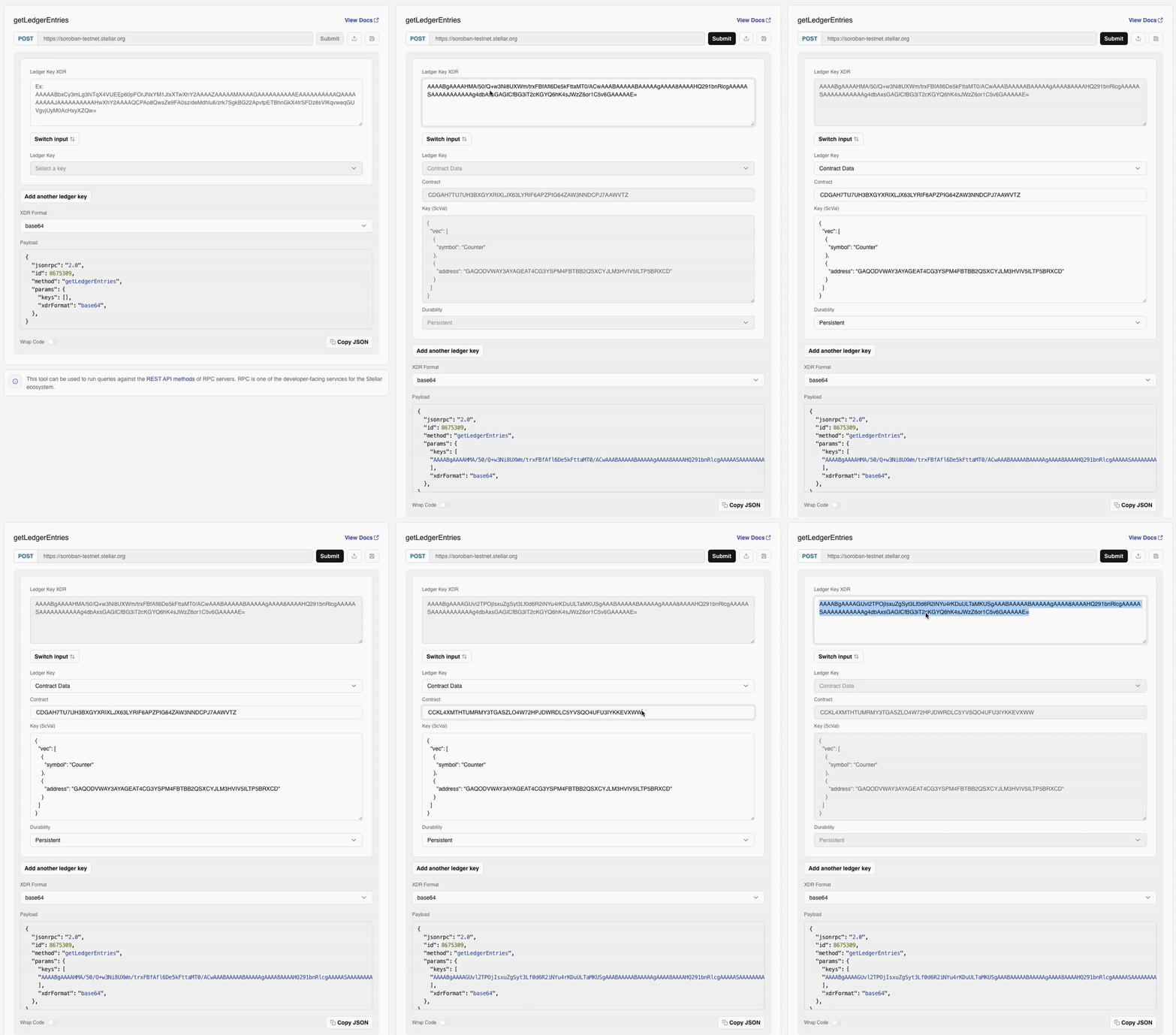
Let's submit getLedgerEntries for the following XDR string:
AAAABgAAAAGUvl2TPOjIsxuZgSyt3Lf0d6R2iNYu4rKDuULTaMKUSgAAABAAAAABAAAAAgAAAA8AAAAHQmFsYW5jZQAAAAASAAAAAAAAAABdOuyYDwLteYrby3aOykd5c12LYrui/nhbXOgtejCSYAAAAAE=
Simulate it in the Lab.